Jump to content


Photo

An Android app for counting laps and lap timing


  • Please log in to reply
2 replies to this topic

#1 lcvaldetaro

lcvaldetaro

    Rookie Keyboard Racer

  • Full Member
  • Pip
  • 9 posts
  • Joined: 05-January 12
  • Gender:Male
  • Location:Coppell, TX

Posted 05 May 2026 - 07:22 PM

Hello, my name is Luiz Valdetaro. I'm new to this board (not really new, but haven't posted for a very long time), but not new to the hobby. I have been at it since the '60s. I own a very large collection (my personal website is http://valdetaro.com).

I'm a professional software developer, and have developed an Android app for counting lap times and taking lap times. Works via the camera, no extra hardware needed.

I published it under a "pen name" Gepetto Club. More info can be found at https://gepetto.club.

Highlights:
- Supports from 1 to 8 lanes.
- Approximate 1/30 second precision timing.
- Works with a single Android device if you want all the functions in one.
- Has the ability to network, so you can have one phone at the track as a "sensor," another one at the steward's hand to stop/start the race, etc. Each individual racer can have their Android device connect to the camera and announce his lap times, etc.
- Can be used in English, Portuguese, French, Spanish, Italian, and German. I used AI for that, but for the languages I speak, it looks like a good translation.
- It is free.

I appreciate if you could try it out and give me your feedback. You can find the app on this link https://gepett.club

Thank you!

Luiz

  • Cheater likes this

Luiz Claudio Valdetaro


#2 lcvaldetaro

lcvaldetaro

    Rookie Keyboard Racer

  • Full Member
  • Pip
  • 9 posts
  • Joined: 05-January 12
  • Gender:Male
  • Location:Coppell, TX

Posted 15 May 2026 - 07:41 AM

Update:


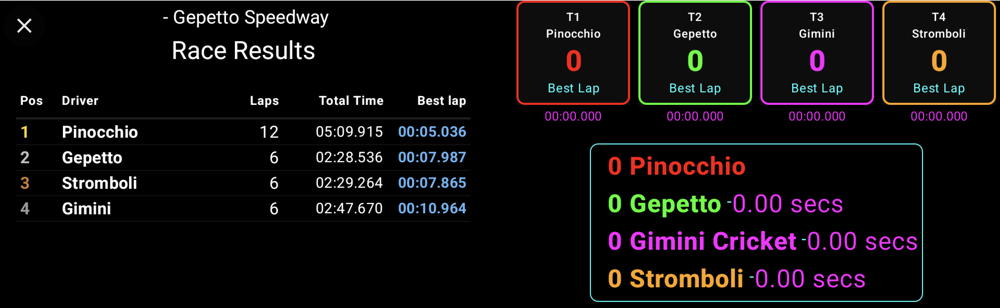
I have published a new version with one major upgrade: a billboard.


If you have a big screen TV that is Android TV (Or Google TV) compatible, or if you attach an Android TV stick to it (around $ 35 on Amazon), (here is one on Amazon https://www.amazon.c..._fed_asin_title), you will have a billboard that everyone can follow the race standings, times, etc. It even has the sounds and voice announcements that the phone has, but of course, louder.


All you need is to go to Google play from the Android TV device, and install the app, the same way you do it on your phone. The app recognizes is running on a large screen device and not a phone, and runs differently.


You can, of course, use the billboard also from a large tablet or a Chromebook PC.


These devices communicate directly with the device with the camera using nearby communications (nowadays called Google Share), and they must be all within proximity and be connected to the same WI-FI. It is all automatic, you don't have to setup  anything. The TV (or tablet, or Chromebook) recognize the phone with the camera timer is on, then they sync in real time.


One thing to keep in mind is that all devices must have a minimum of Android 12 for this nearby communications capability.


Bellow is a picture of the billboard screen:


bb.jpg


Thank you for all your feedback, I really appreciate it.


Luiz


Luiz Claudio Valdetaro


#3 lcvaldetaro

lcvaldetaro

    Rookie Keyboard Racer

  • Full Member
  • Pip
  • 9 posts
  • Joined: 05-January 12
  • Gender:Male
  • Location:Coppell, TX

Posted 26 May 2026 - 09:14 AM

Update:


There has been an update that addresses a lot of minor bugs on the Gepetto Slot Car Lap Counter app.


I have seen an uptick in downloads, so a lot of you are using the app. And in all six languages it supports... I'm very grateful! Thank you!


However, more feedback would be very welcome. I can't possibly anticipate all the ways you guys use the app. And, I believe the app should adapt to the way you race, not the other way around.


This is the way I race... The setups I use to test the app:


I have a Revell track with tqo lanes track (my test track) and another with four (Carrera) lanes. My brother in Brazil has a Revell track with two lanes.


In my four-lane Carrera track, I placed an old Pixel 3 Android phone, firmly fixed in my starting bridge. It is plugged to a USB charger and its camera functions as my 'sensor.' The Pixel 3 does not issue sounds or voice announcements, I switched that off on the app settings.


In that room, I have a 50-inch screen TV, I attached a 35 dollar Android TV stick to it, and I loaded the app on it via the Play Store. When I'm going to do anything (such as adding drivers, etc,.), I use my main current phone, a Pixel 9. Bring the 'Steward' mode, and start, stop, etc. the race. My TV has a nice soundbar, and makes loud announcements about lap times, winners, etc. My guests, if they have a phone with Android 12 or later, connect to the camera and get their lap times spoken on their own phone. I recommend earphones for that, otherwise it is cacophony galore!


In myth- lane Revell track, I have an old Samsung that used to be my wife's (don't even remember the model, but it runs Android 12), also fixed on a bridge and plugged to a USB charger. I also use my main Pixel 9 to start/stop a race. Sounds and voice announcements come from the Samsung itself.


My brother uses his own phone (I don't know the brand) on his track and does everything from the phone placed on top of the starter bridge. Simple setup. For that, even a phone with Android 7 will do the trick.


What is your setup? How are you using the app? What improvements would you like to see? What bugs (hopefully none, but I'm realistic) have you experienced? Is there something you can't figure out how to use it? I can help, and also write better instructions if needed.


Thank you very much for your feedback! Don't be shy! Feel free to ask me here, or via my whatsapp (+14692689670), via email (lcvaldetaro@gmail.com), or via the Play Store feedback link.


Luiz


Luiz Claudio Valdetaro


Electric Dreams Online Shop
